Case study
Ramper Pipeline
Optimizing a B2B sales extension for WhatsApp
Executive summary
B2B sales reps and SDRs faced high friction using Ramper's Chrome extension on WhatsApp Web: a confusing menu with duplicated icons and no way to log conversation history in the main platform. I unified the navigation architecture, prioritized the Opportunity Management flow and created 1-Click Conversation Export, cutting lead logging time and drastically reducing navigation errors. The result: logging time down from 9 to 4 minutes (−56%) and navigation errors down from 8 to 1 per day per person (−88%).
Context & problem
Ramper Pipeline is a Chrome extension that connects WhatsApp Web to Ramper's sales platform, letting account executives and SDRs manage contacts, create opportunities and log interactions without leaving the WhatsApp tab.
Usage analysis and user feedback revealed two main bottlenecks
Confusing navigation architecture
The main menu was split into two sections with identical icons for different functions, causing cognitive overload and frequent misclicks.
Lost communication history
Reps had no simple way to save WhatsApp conversations as history (a backup) in Ramper's CRM, creating blind spots for sales management.
Immersion & discovery
To understand the prospecting and customer-support routine of B2B sales reps, we analyzed their daily workflow as they switched between WhatsApp Web and the extension.
Key discovery insights
Focus on closing
Opportunity management is the rep's highest-value daily action, but it was buried in the extension's visual hierarchy.
Fast logging
Reps work under time pressure; any long form or multi-click navigation makes them skip logging notes and tasks.
Conversation traceability
Sales managers needed visibility into negotiations happening on WhatsApp to help close accounts.
Design decisions & trade-offs
Rather than just “redesigning screens”, we focused on restructuring the information architecture to serve business goals:
Unified menu (floating menu)
We removed the two confusing sections and consolidated every action into a single, intuitive floating menu.
Opportunity card up front
We reordered the visual hierarchy so contact details and opportunity status are visible immediately on the plugin's main screen.
1-click conversation export
A simplified flow to move relevant WhatsApp history into the platform, as a strategic record and backup.
In-flow micro-interactions (notes & tasks)
Quick components to add notes and schedule tasks linked to the contact without interrupting the active conversation.
The solution: new architecture & screens
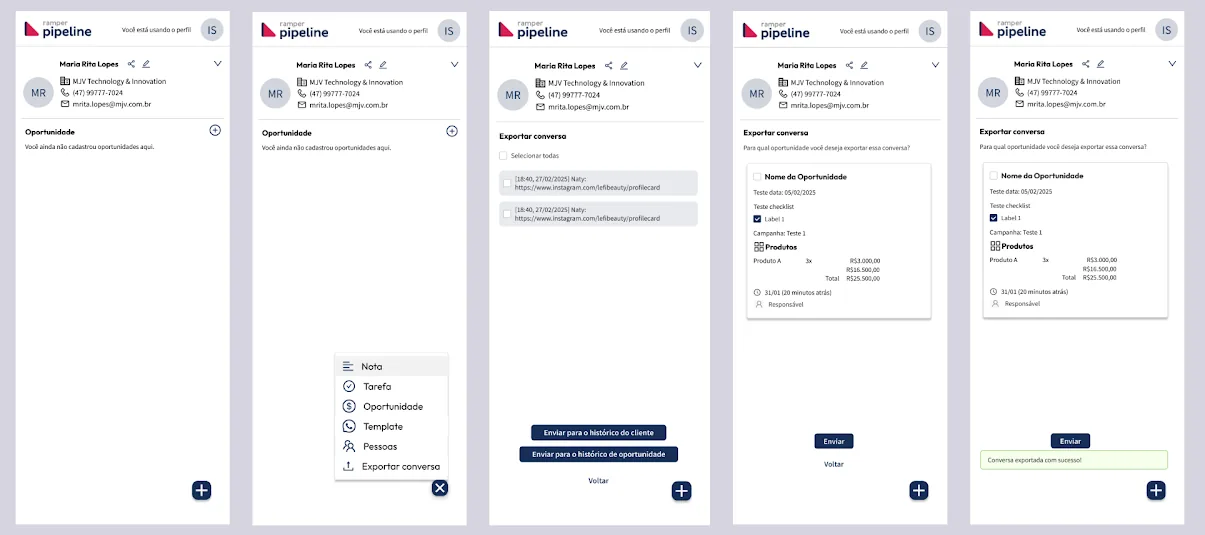
New feature: export conversations
Export WhatsApp conversations to the platform as a backup.
Person records
A redesigned interface for registering people, aimed at clarity and ease of use.
Opportunity records
A redesigned interface for creating and managing opportunities, aimed at clarity, effectiveness and a better user experience.
Viewing opportunities
An overview of the interface used to browse and manage logged opportunities.
Adding and viewing notes and tasks
Features to add and review notes and tasks linked to an opportunity or contact.
Validation & business impact
- less time to log a lead or opportunity (from 9 to 4 minutes)
- 56%
- fewer menu navigation errors (from 8 to 1 per day, per person)
- 88%
- of conversations exported and synced to the platform
- 93%
Usability and efficiency
The simpler menu and the prominent opportunities tab reduced the clicks needed to log an interaction.
History adoption
Conversation export became the standard for handoffs between SDRs and Account Executives.
Visual consistency
Standardized extension components aligned with the web product's visual language.
| Metric | Before | After | Change |
|---|---|---|---|
| Time to log a lead/opportunity | 9 min | 4 min | −56% |
| Menu navigation errors | 8 per day, per person | 1 per day, per person | −88% |
| Conversations exported/synced | Not synced (manual export) | 93% exported and synced | Automatic sync |
Learnings & next steps
Designing browser extensions means dealing with extreme screen-space (viewport) constraints and with WhatsApp Web's own interface.
Next step
Exploring smart auto-fill for notes and integration with automatic lead-qualification tags.